Overview:
The Inventory Costing Method determines how item costs are calculated and recorded in stock transactions and inventory-related reports. Selecting the appropriate costing method ensures accurate inventory valuation and reliable financial reporting.
N3 AI Accounting supports the following inventory costing methods:
Fixed Cost – Assigns a predefined and consistent cost to an item, regardless of supplier price changes. This method provides stable inventory values and predictable costing across all stock transactions.
Weighted Average – Calculates item cost by averaging the total cost of available stock over the total quantity on hand. This method smooths out price fluctuations and reflects a more balanced inventory cost.
Scenario:
A business frequently experiences changes in supplier pricing and wants better control over how inventory costs appear in reports. To maintain consistent costing for internal analysis and pricing decisions, the accounting team decides to switch the inventory costing method to Fixed Cost. By updating the costing method in system settings, all future stock transactions will follow the selected method.
Procedure:
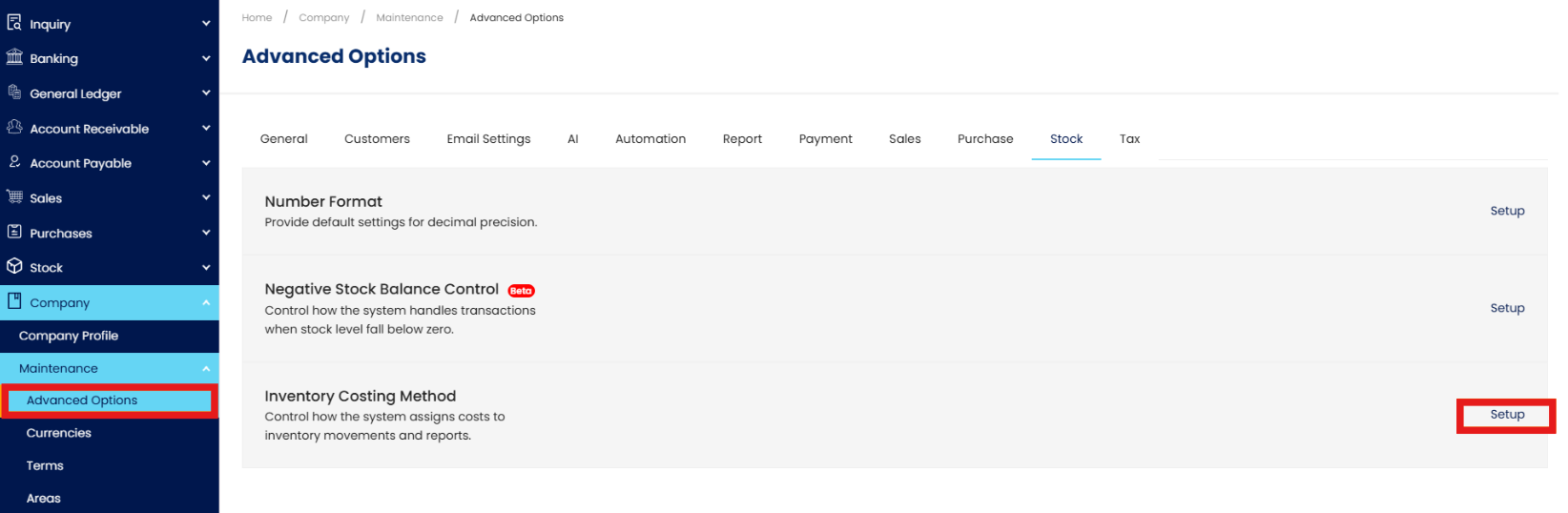
In the navigation pane, go to Company > Maintenance > Advanced Options > Stock > Inventory Costing Method > Setup.
Click the dropdown > Select your preferred costing method > Click OK to save the changes
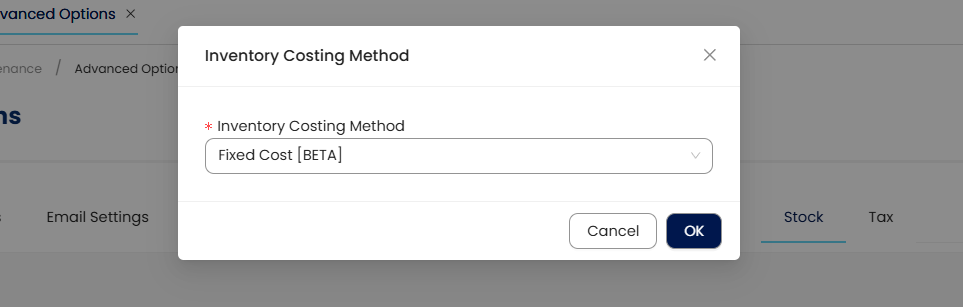
Note: Changing the Inventory Costing Method will trigger the recalculation of inventory-related reports based on the selected costing method. This ensures consistency in inventory valuation and costing figures reflected in reports after the change.
Application:
Cost Stability: Maintain consistent item costs despite purchase price fluctuations.
Inventory Valuation: Apply a predictable costing method for stock reporting.
Pricing Support: Use reliable cost data to guide pricing decisions.
Operational Efficiency: Reduce frequent cost recalculations for high-volume items.
Accounting Alignment: Ensure inventory costing aligns with internal policies and reporting requirements.
System Scope: N3 AI Accounting (formerly QNE AI Cloud Accounting)
Was this article helpful?
That’s Great!
Thank you for your feedback
Sorry! We couldn't be helpful
Thank you for your feedback
Feedback sent
We appreciate your effort and will try to fix the article