Overview:
The Supplier Aging by Currency report shows all unpaid supplier balances organized by the transaction currency used in each bill. It helps Accounts Payable, Finance, and Procurement teams track overdue payables, understand currency-related exposure, and prepare accurate month-end reports.
By grouping payables by currency, the report makes it easy to see which suppliers and currencies require payment attention, helping users manage cash flow and foreign exchange risks more effectively.
Scenario:
At month-end, the Accounts Payable Supervisor reviews overdue supplier balances. Since suppliers bill in PHP, USD, and other currencies, the team needs to understand the FX (Foreign Exchange) impact—meaning how exchange rate changes affect the value of foreign-currency payables.
To simplify this review, the supervisor generates the 6 Months Supplier Aging by Currency report to quickly see all unpaid amounts grouped by currency and confirm the balances for closing.
Procedure:
Go to Reporting > Report Center > Supplier > Supplier Aging > 6 Months Supplier Aging.
In the Select Report dropdown, choose 6 Months Supplier Aging by Currency.
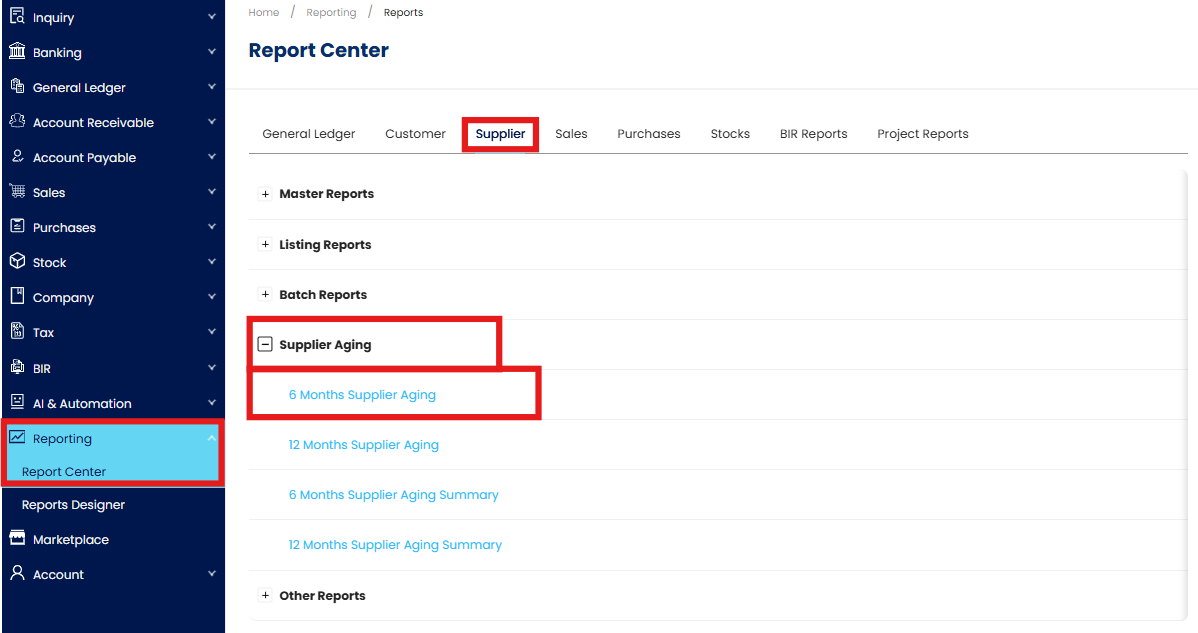
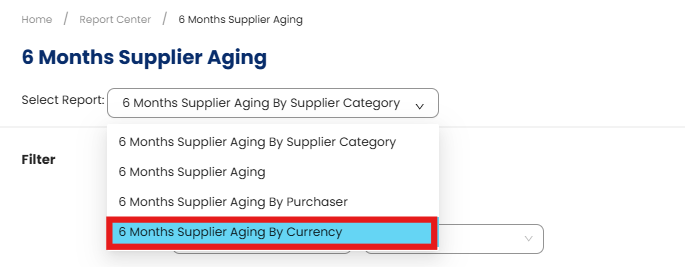
In the Filter section, configure the available fields as needed:
As of – Select the cutoff date for the aging computation.
Supplier – Filter by specific supplier or leave blank to include all.
Purchaser – Filter by assigned agent.
Doc Purchaser – Filter by document purchaser,, if applicable.
Area – Filter by supplier area or region.
Category – Select the supplier category.
Control A/C – Choose the supplier control account.
Project - Filter by project (visible only if the add-on module is enabled).
Title View By - Choose between Month or Day.
Exclude - Check statuses to exclude: Active, Inactive, Suspended.
Sort By – Select Supplier Code or Supplier Name for sorting
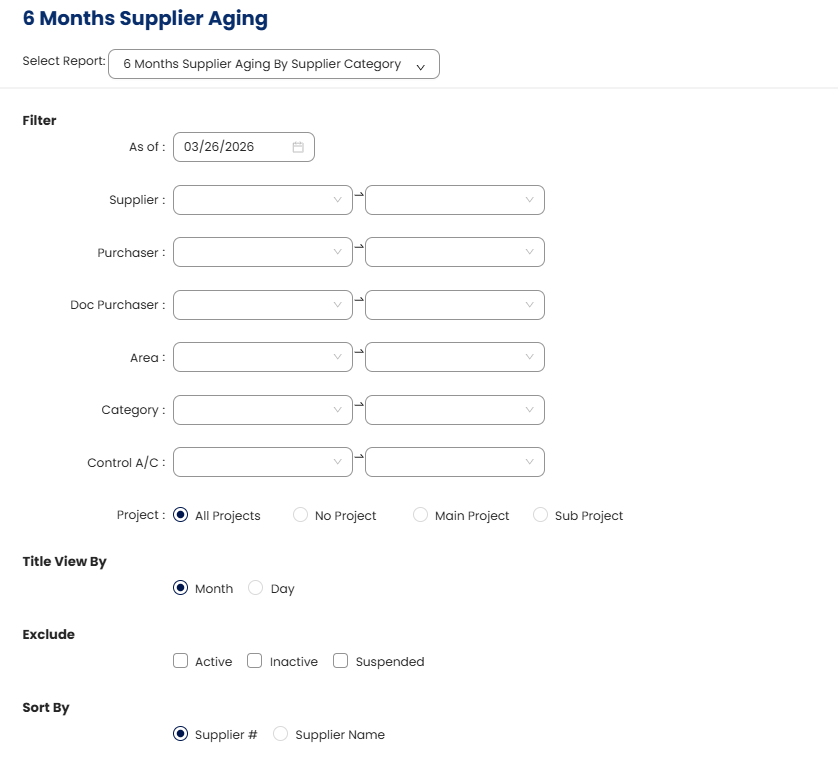
Click Preview to generate the report.
Review the aging summary and verify that all payables are grouped and displayed correctly by currency
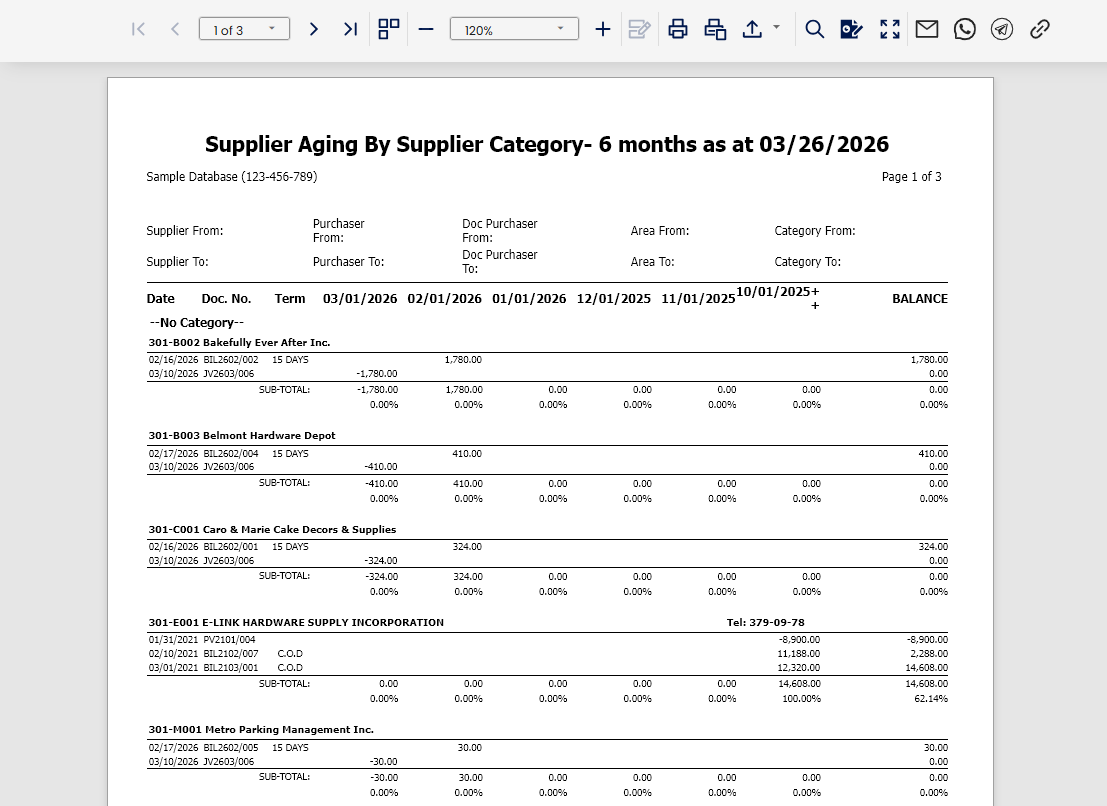
Note: The same procedure and filter settings apply if you need to generate the 12-Month Supplier Aging by Currency report. Simply select “12 Months Supplier Aging by Currency” from the Select Report dropdown and follow the exact same steps.
Application:
Multi-Currency Payables Tracking: Monitor outstanding supplier balances across different currencies in one consolidated report.
Payment Scheduling and Prioritization: Identify which suppliers and currencies have the highest overdue amounts to plan payments efficiently.
Month-End AP Reconciliation: Provide accurate currency-based aging data needed for AP accruals, reconciliation, and financial statement preparation.
Foreign Exchange Exposure Analysis: Assess payables denominated in foreign currencies to evaluate FX risks and plan hedging or funding strategies.
Cash Flow and Disbursement Planning: Forecast upcoming payables per currency to manage liquidity, bank withdrawals, and funding allocations.
Audit and Compliance Documentation: Supply a clear, currency-segmented record of supplier aging for audit reviews and internal controls.
System Scope: N3 AI Accounting (formerly QNE AI Cloud Accounting)
Was this article helpful?
That’s Great!
Thank you for your feedback
Sorry! We couldn't be helpful
Thank you for your feedback
Feedback sent
We appreciate your effort and will try to fix the article