What’s New
This release expands the 'Park & Post' functionality across more transaction forms, enhances audit trails for imported transactions and recurring entries, and introduces new Philippine tax forms (BIR 1600VT) with improved compliance reporting. It also includes various usability improvements for reports, transaction forms, and data display across Sales, Purchases, Accounts Receivable, and Accounts Payable modules.
September 03, 2026
✨Key Feature
1. Expanded Park & Post Functionality
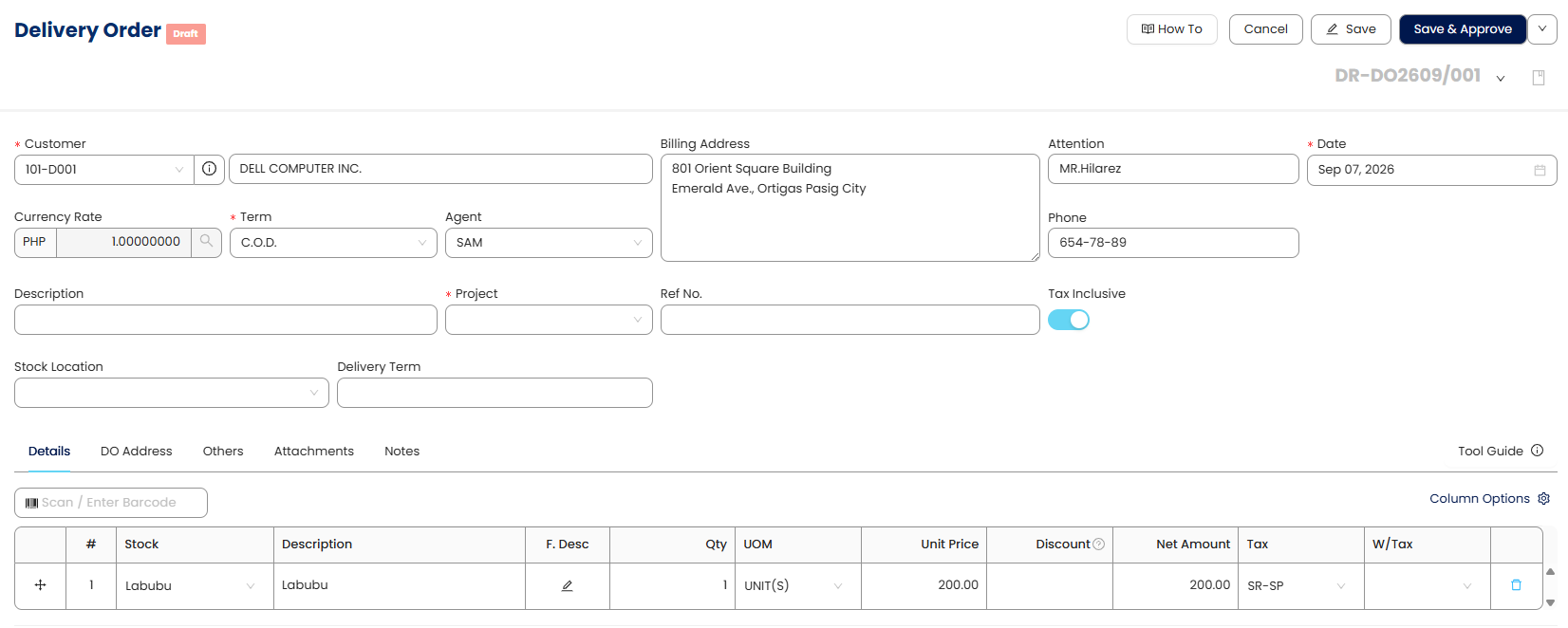
Users can now use Park & Post across a wider range of transaction forms, allowing them to temporarily save transactions as Draft for review or Post/Approve completed transactions when ready. This functionality has been expanded to cover GL Posting, Inventory Posting, Customer Invoice, Debit Notes, Credit Notes, Customer Refund, Supplier Refund, Quotations, Sales Order, Delivery Orders, Sales Debit Notes, Sales Credit Notes, Cash Sales Refund, Purchase Requisition, Purchase Order, Good Received Notes, Purchase Debit Notes, Purchase Returns, Cash Purchase Refunds, Stock Ins, Stock Outs, Stock Transfer, and Stock Adjustment.
This enhancement provides a more consistent transaction workflow across modules, giving users greater control over when transactions are reviewed and finalized.

✨BIR CAS & Other Localization
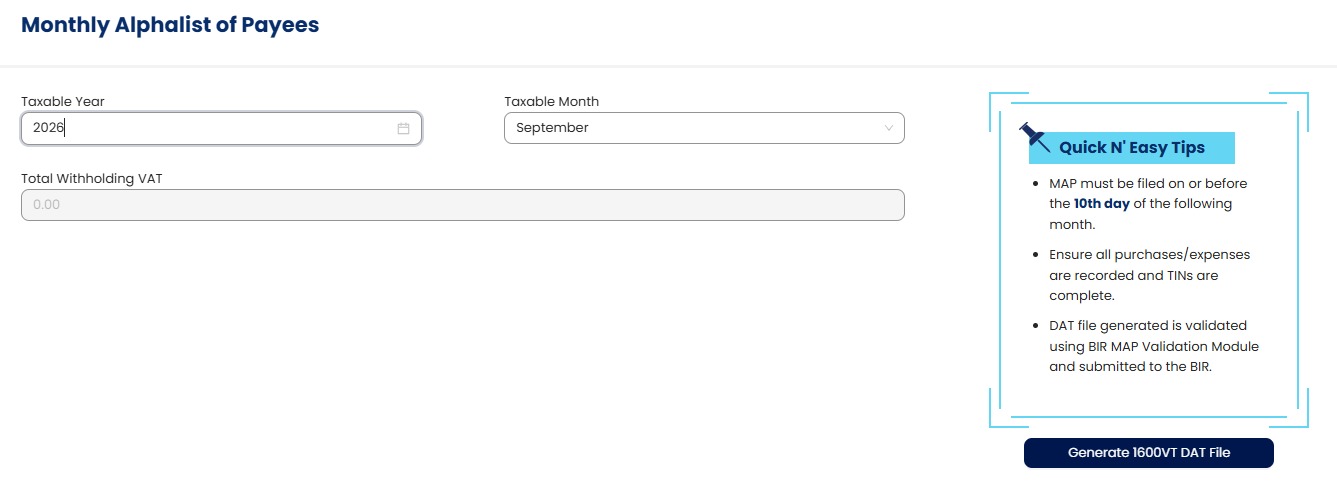
2. BIR 1600VT Form, Preview, and MAP/DAT File Generation
Users can now prepare and preview the BIR 1600VT Form directly in the system and generate the required MAP and DAT files for BIR submission. This provides a more convenient and efficient way to prepare, validate, and submit the required tax information.
3. Withholding VAT Functionality in Supplier and Purchases
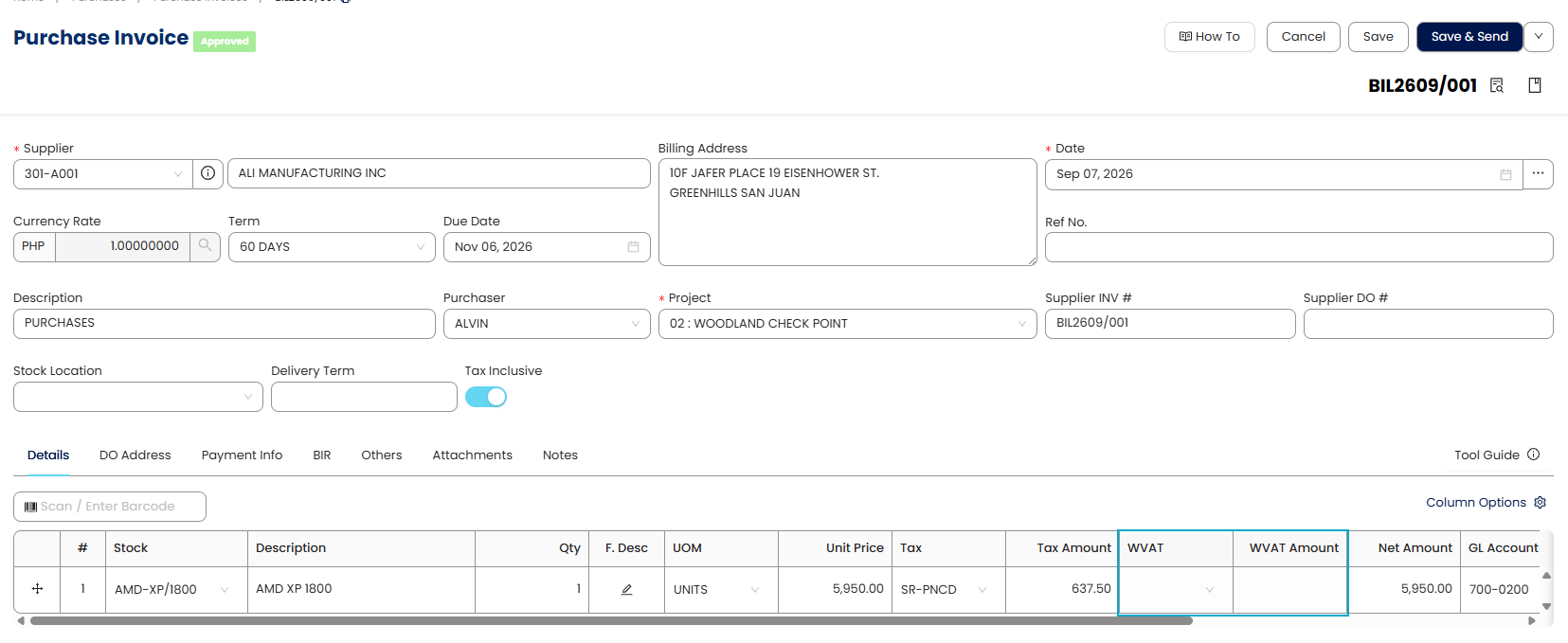
Users can now apply and manage Withholding VAT directly within Supplier and Purchase transactions. This enhancement helps users accurately record withholding vat, reduce manual adjustments, and ensure that the related tax information is properly reflected in their transactions and reports.
4. Enhanced Audit Trail for Imported Data
The audit trail now records the creation and modification of past transactions and opening balances imported via data migration. This includes detailed logging for imported Opening Balance, Past AR, and Past AP transactions, providing a comprehensive history of data changes.
5. Audit Trail for Posted Recurring Transactions
Posted recurring transactions are now fully reflected in the audit trail. This provides a complete and transparent record of all automated entries for better compliance and oversight.
✨General Ledger
6. Generate Journal Entry for Zero-Amount Transactions
The system will now generate journal entries for zero-amount transactions in Customer Invoice, Customer Debit Notes, Customer Credit Notes, Supplier Bills, Supplier Debit Notes, and Supplier Credit Notes, even when the total amount is zero due to offsetting GL lines. This ensures proper recording of debit and credit movements for all valid transactions.
✨Account Receivable
7. Add Customer Area to Sales Invoice Report Designer
The system will now generate journal entries for zero-amount transactions in Customer Invoice, Customer Debit Notes, Customer Credit Notes, Supplier Bills, Supplier Debit Notes, and Supplier Credit Notes, even when the total amount is zero due to offsetting GL lines. This ensures proper recording of debit and credit movements for all valid transactions.
8. Add Email, Phone No., and Fax No. to Customer Refund List View
Email, Phone No., and Fax No. columns have been added to the Customer Refund list view. This allows users to quickly view essential customer contact information without needing to open individual customer records.
9. Add 'OutstandingAmountinWords' to Sales Reports
The 'OutstandingAmountinWords' field is now available in the report designers for Quotations, Sales Orders, and Delivery Orders. This provides consistency with Sales Invoices and improves clarity by displaying outstanding amounts in a clear, understandable format for clients across various sales documents.
✨Sales
10. Improve Exported File Names for Sales Orders and Delivery Orders
Exported file names for Sales Orders and Delivery Orders now include the 'Customer Name' instead of the 'Company Name' and the document number. This provides more relevant and easily identifiable file names.
11. Add 'TaxTotalAmountLocal' to Sales Transaction Report Designer
A 'TaxTotalAmountLocal' field has been added to the report designer for Quotation, Delivery order, Sales Invoice, Sales Debit Notes, Sales Credit Notes, Cash Sales, and Cash Sales Refund. Users can now include local-currency tax totals in custom report layouts, ensuring accurate display of tax computations.
12. Net Amount as Default Column in Sales Transaction Grids
The 'Net Amount' column will now be displayed by default in sales transaction grids instead of the 'Serial Number' column. This makes it more convenient for users to view the net amount immediately without manual adjustments.
✨Purchases
13. Add 'TaxTotalAmountLocal' to Purchase Transaction Report Designer
A 'TaxTotalAmountLocal' field has been added to the report designer for Purchase Requisition, Purchase Order, Goods Received Notes, Purchase Invoice, Purchase Debit Notes, Purchase Return, Cash Purchase, and Cash Purchase Refund. Users can now include local-currency tax totals in custom report layouts, ensuring accurate display of tax computations.
14. Net Amount as Default Column in Purchase Transaction Grids
The 'Net Amount' column will now be displayed by default in purchase transaction grids instead of the 'Serial Number' column. This makes it more convenient for users to view the net amount immediately without manual adjustments.
✨Stock
15. Remove Stock Group Fields from Sales and Purchase History Inquiry
The 'Stock Group' and 'Stock Group Name' fields have been removed from the Inquiry -> Sales History Inquiry and Inquiry -> Purchase History Inquiry. This streamlines the display of relevant information in these inquiry reports.
✨Other Enhancements
16. Auto-Scroll to Newly Added Line in Transaction Forms
When adding new line items in various transaction forms (e.g., Sales Delivery Order, Sales Invoice, Purchase Invoice), the system will now automatically scroll to the newly added line. This improves usability by eliminating the need for manual scrolling after adding multiple items.
17. Enhanced 'Submit to App Store' Modal
The 'Submit to App Store' modal has been enhanced to capture additional submission-related information, such as Application Icon, descriptions, version, video URL, support contacts, and pricing details. All new information is saved in the QSMS database for future reference and tracking.
18. Enhanced App Details Pane
The 'App Details' pane now dynamically displays the latest application information maintained in QSMS, including newly added fields. This ensures that users always see up-to-date and comprehensive details about applications.
Was this article helpful?
That’s Great!
Thank you for your feedback
Sorry! We couldn't be helpful
Thank you for your feedback
Feedback sent
We appreciate your effort and will try to fix the article