What’s New
This release introduces a new VAT Credits Module and related reports to comply with BIR regulations, allowing users to claim and track VAT credits on overdue receivables and payables. It also enhances the system with an AI-powered customer service standalone add-on and improves reporting, user interface, and integration capabilities across various modules.
October 05, 2026
Key Features
------------
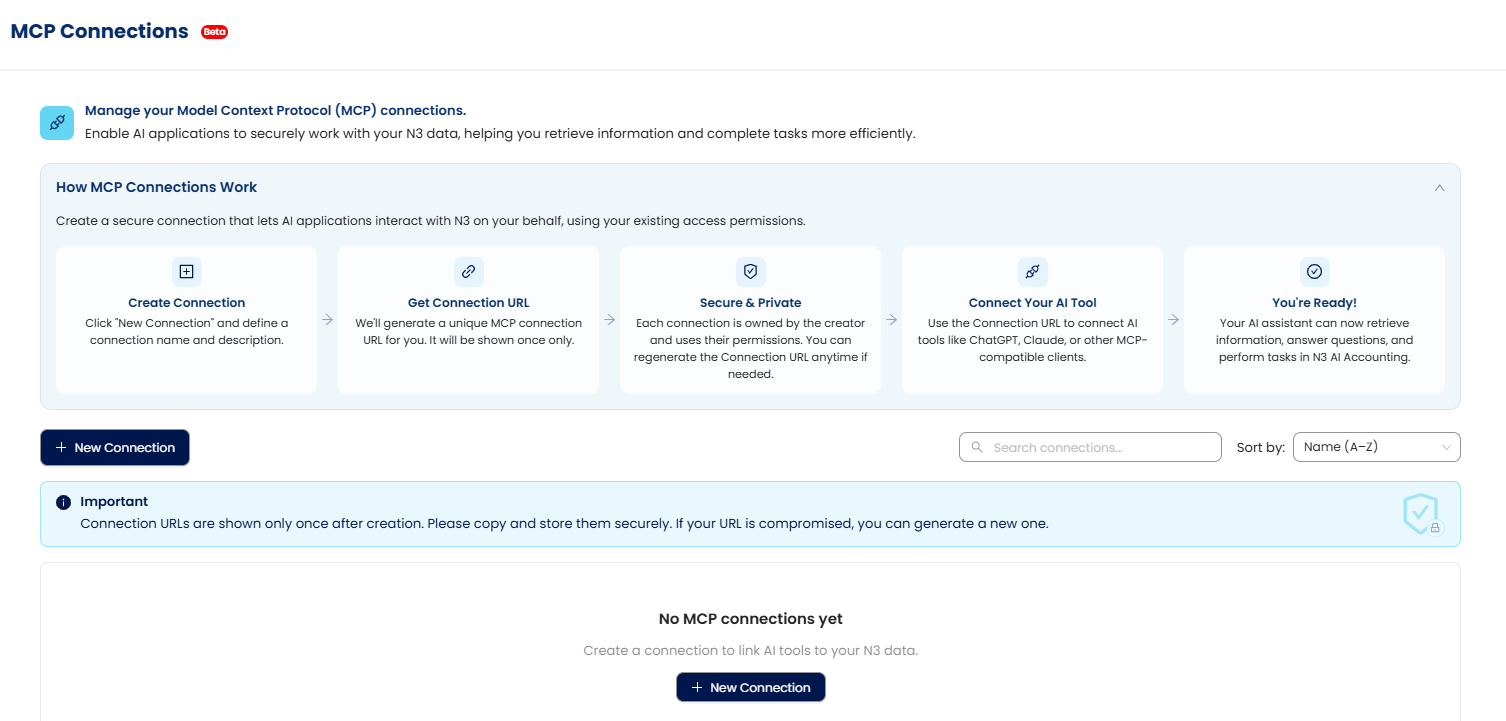
1. MCP Connection for Master Data and Transactions
Outbound is now available, allowing you to subscribe remote HTTPS URLs to N3 master-data and transaction events. When supported records are created, updated, deleted, voided, or cancelled, N3 will POST a documented envelope to matching subscribers, with delivery history queryable via API.
2. New VAT Credits Module for BIR Compliance
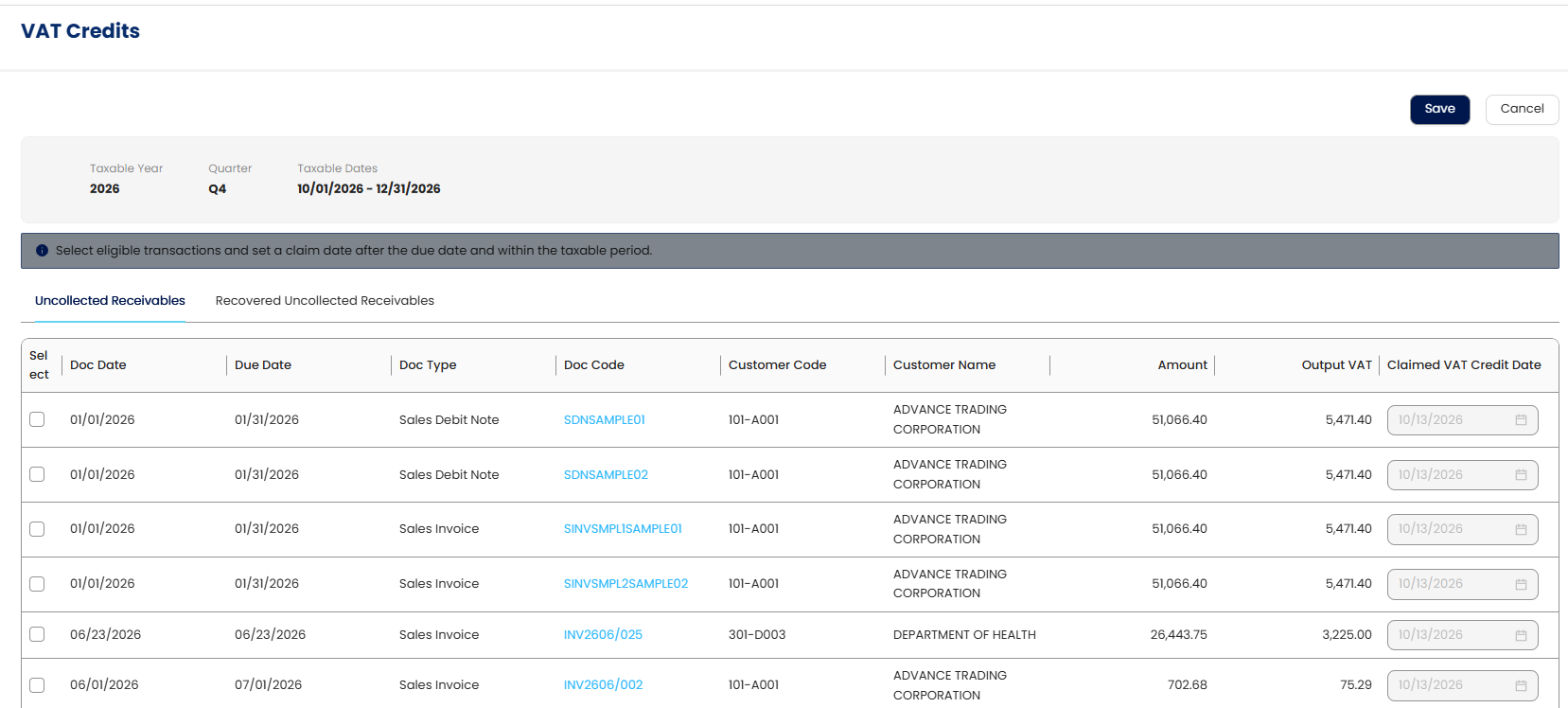
A new VAT Credits module is now available, enabling you to claim eligible VAT on overdue receivables and payables in compliance with BIR Revenue Regulations (RR). The system automatically tracks the recovery and settlement of these VAT credits, and you can monitor all related transactions within the module.
3. VAT Credit Listing Report
This new report automatically reflects claimed and recovered VAT credits in your VAT Declaration and BIR 2550 forms. It eliminates manual input by populating data from tagged VAT transactions, ensuring accuracy and providing drill-down references to source transactions for verification and audit.
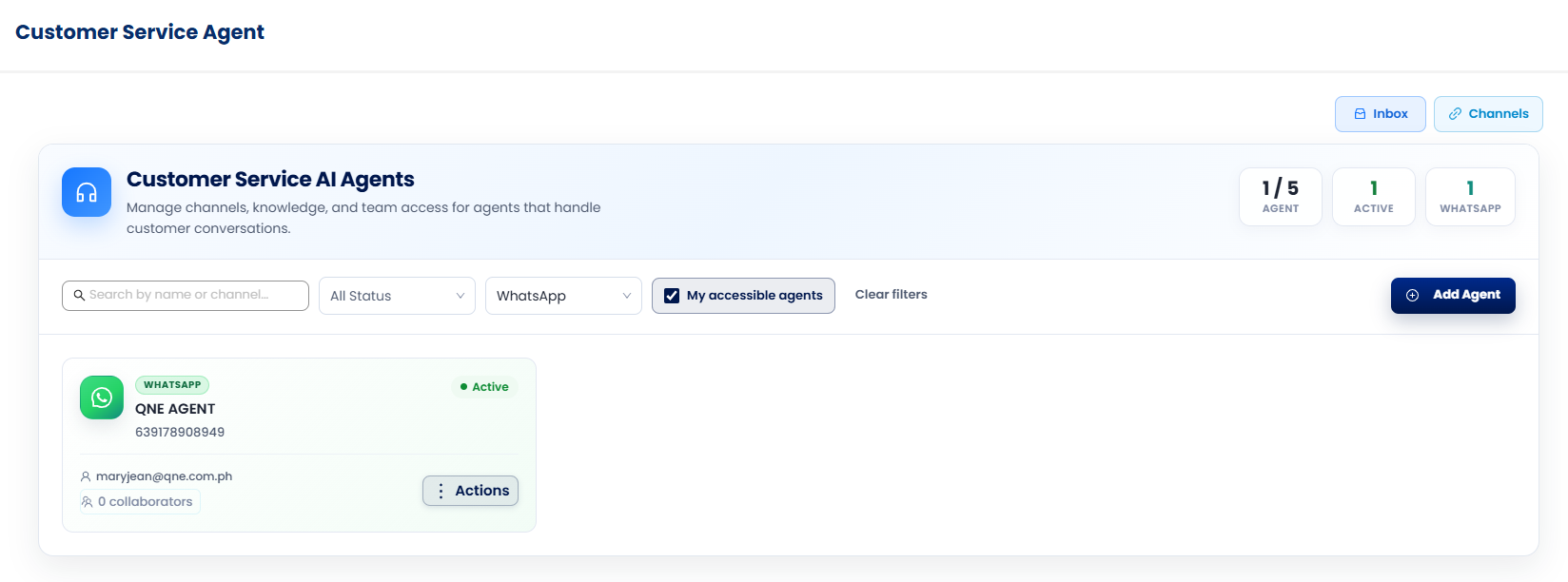
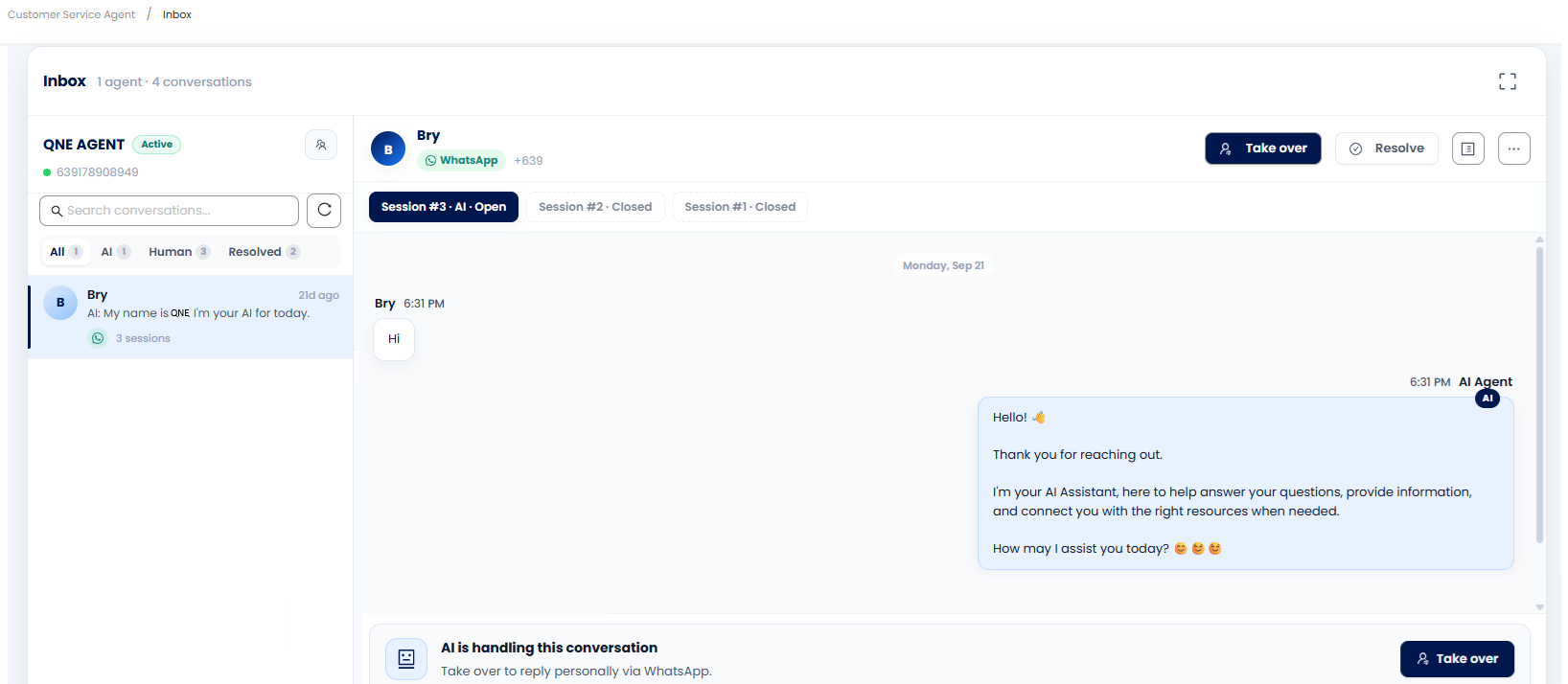
4. Customer Service AI
Introduced AI-powered customer service via WhatsApp with standardized responses, intent recognition, knowledge-based guidance, configurable human escalation, business hours handling, and automated CSAT surveys after conversation resolution or closure.
BIR & Other Localization
------------------------
5. Display Claimed VAT Credits in VAT Declaration and BIR Form 2550Q
Claimed VAT credits will now automatically display in the VAT Declaration and BIR Form 2550Q, with amounts split across months based on payment posting dates. This ensures accurate reporting of uncollected and recovered VAT, with line numbers like 35, 36, 55, and 58 automatically populated.
6. Customer & Supplier BIR Information Portal
A new BIR Information Portal allows your customers and suppliers to complete or update their BIR details. They can manually enter information or upload supporting documents for automatic field population, review extracted data, and submit updates securely with OTP verification.
7. Claimed VAT Credit Tagging in Transactions and Audit Trail
You can now tag claimed VAT credits directly within sales invoices, customer debit notes, cash transactions, bills, purchase invoices, and supplier debit notes. While tagging is read-only on transaction screens, changes made in the VAT credit module will reflect automatically, with an audit trail maintained solely within the VAT credit module.
8. Payment/Remittance Feature for Monthly and Quarterly BIR Forms
A new payment/remittance feature has been added for monthly and quarterly BIR forms. This enhancement considers the potential for an API to mark forms as filed and manage payments, streamlining your BIR compliance process.
9. BIR Form 1601-EQ Form Screen
The BIR Form 1601-EQ now features a user-friendly form-like interface. This new layout simplifies data input, automatically computes withholding amounts, and stores your submission history for easy access and reference.
10. Manual Numeric Input in BIR 1604-E 'Number of Sheets Attached'
You can now manually enter a numeric value in the 'Number of Sheet/s Attached' field in BIR Form 1604-E. This removes the previous restriction to up/down controls and ensures any validation messages correctly reference BIR 1604-E.
General Ledger
--------------
11. Exclude Input and Output Tax from Blank Chart of Account Template
The 'Blank Template' for Chart of Accounts will no longer include default Input and Output Tax accounts (except for Malaysia). This provides a truly empty template for users who wish to import their own custom account structures, preventing the need for manual removal.
Account Receivable
------------------
12. Customer Area Field in Sales Invoice Report Design
The 'Customer Area' field is now available in the Sales Invoice preview report designer. This allows you to easily include and display customer area details in your sales invoice reports for improved customer identification.
Account Payable
---------------
13. Custom Report as Default in Bills (BIR Form 2307 as Secondary)
When you set a custom report (e.g., custom Bill Voucher) as default in Reports Designer, it will now be the first-priority default preview format in Bills and Purchase Invoices. BIR Form 2307 will remain available as a secondary default option, ensuring your preferred report is always shown first.
Sales
-----
14. Outstanding Amount in Words for Quotation, Sales Order, Delivery Order Reports
The 'OutstandingAmountinWords' field is now available in the report designer for Quotations, Sales Orders, and Delivery Orders. This allows you to present outstanding amounts in a clear, word-based format, consistent with the Sales Invoice report.
15. Net Amount as Default Column in Sales Transaction Grids
The 'Net Amount' column is now displayed by default in sales transaction grids, replacing the 'Serial Number' column. This provides immediate visibility of the net amount without needing to manually adjust column settings.
16. {CustomerName} Field in Transaction Send Notification Template
The '{CustomerName}' variable now correctly displays the customer's name in the Transaction Send Notification Template. This ensures personalized and accurate notifications are sent to your customers.
Purchases
---------
17. Net Amount as Default Column in Purchase Transaction Grids
The 'Net Amount' column is now displayed by default in purchase transaction grids, replacing the 'Serial Number' column. This provides immediate visibility of the net amount without needing to manually adjust column settings.
Stock
-----
18. ProjectCode and ProjectName in Stock Out Listing Report Designer
The 'ProjectCode' and 'ProjectName' fields are now available in the Stock Out Listing report designer. This allows you to display and identify stock-out entries by project, enhancing your inventory reporting capabilities.
Other Enhancements
------------------
19. Customer & Supplier Update Tax Approval with Auto-create TIN Library Records
The system now supports tax approval updates for customers and suppliers, with an automatic creation of TIN Library records. This streamlines the process of managing and verifying tax identification numbers for your contacts.
20. BIR Tax Info Advisor
A new BIR Tax Info Advisor feature has been added. This provides assistance and guidance related to BIR tax information, helping you navigate compliance requirements more easily.
21. Reduced High Severity Issues in Backend Code
Efforts have been made to significantly reduce the number of high-severity issues identified in the backend code, targeting a 15% reduction. This improves overall system stability and performance.
22. API Documentation Enhancement: Knockoff for APPV Creation
The API documentation has been enhanced to include knockoff functionality for AP Payment Voucher (APPV) creation. This allows users to post an AP Payment with knockoff items to N3 via the API.
23. MCP: Commands to Assign Agent, Purchaser, Project, and Stock Location
New commands have been added for MCP connections, allowing you to assign Agent, Purchaser, Project, and Stock Location when creating or transferring transactions in AR, AP, Sales, and Purchases. This ensures these fields are correctly populated directly through AI interactions.
24. Consolidate Grid Status Display
The system now consolidates grid status displays into clear, orthogonal status dimensions. This improves clarity and consistency when viewing statuses within various system grids.
25. QCA Marketplace Navigation Update
The QCA Marketplace navigation has been updated to ensure the Marketplace option is clickable and behaves consistently with the Marketplace option in the QCA Header. This provides a smoother user experience when accessing the marketplace.
26. Disable 'New App' Option in QCA Marketplace > My Apps
The 'New App' option in QCA Marketplace > My Apps has been disabled. Users can still view and manage existing apps, but new app creation is now exclusively available through the N3 AI App Builder (n3.qne.cloud).
27. Allow Assignment of Tax Command in MCP
Transactions created via MCP can now assign tax codes from N3. The MCP commands support retrieving and assigning N3-configured tax codes, with validation for tax type (Input/Output) and active status to ensure accurate assignment in transactions.
Was this article helpful?
That’s Great!
Thank you for your feedback
Sorry! We couldn't be helpful
Thank you for your feedback
Feedback sent
We appreciate your effort and will try to fix the article